
I’ve been using Chrome since it was basically a beta project, and I’ve watched it go from a lean, fast browser to a memory-hungry beast that somehow still can’t manage tabs properly. So when Google announced AI Mode for Chrome back in 2025, I was skeptical. Another AI feature bolted onto a browser? Great.
But the latest update, which started rolling out this week, actually addresses something that’s bugged me for years: the constant tab switching when you’re researching something. You search, open a result in a new tab, then another, then you’re five tabs deep and you’ve lost the thread of your original query. It’s a mess.
Side-by-side without the headache
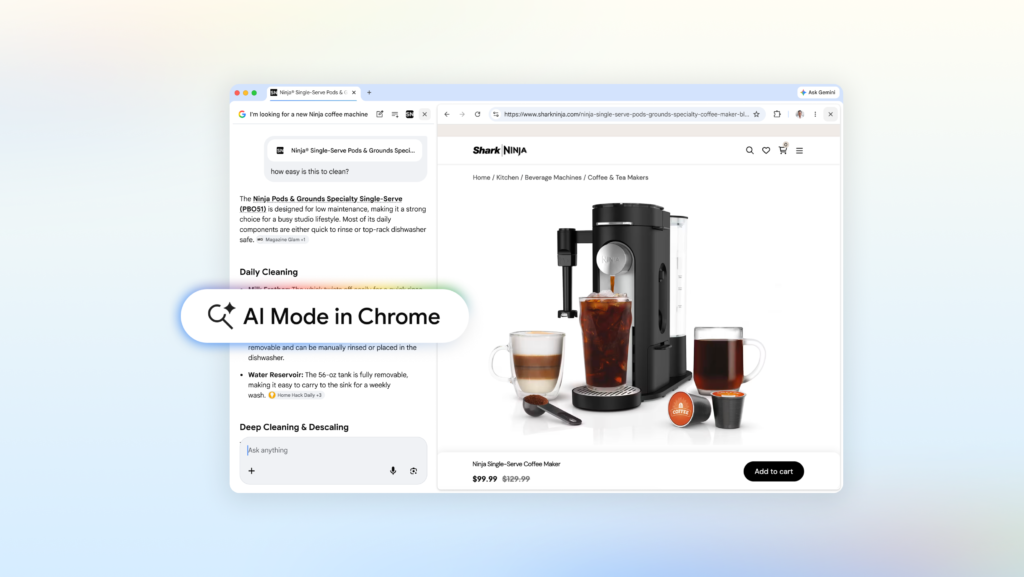
The headline feature here is that clicking a link in AI Mode now opens the webpage right next to your search results, not in a separate tab. This sounds small, but it makes a real difference when you’re trying to compare products or dig into a topic. I tried it with a coffee maker search, which is exactly the kind of mundane shopping task where this shines. I asked AI Mode for recommendations for a compact espresso machine that fits in a small apartment, got a list of options, clicked one, and the retailer’s site opened on the right side of the screen. I could ask follow-up questions like “How easy is this to clean?” and AI Mode answered using both the page content and broader web data. No tab switching, no losing my place.
The same logic applies to more complex research. If you’re reading about McLaren’s pit crew training methods, you can open the official site alongside AI Mode and ask questions without breaking your flow. Early testers apparently loved this, and I can see why. It’s one of those features that feels obvious once you use it, but nobody thought to do it properly before.
Search across your open tabs
The second big addition is the ability to search across your currently open tabs. On Chrome desktop or mobile, you can hit the new “plus” menu in the search box on the New Tab page, or the existing plus menu inside AI Mode, and select recent tabs to include as context. You can also mix in images and files like PDFs.
This is more useful than it sounds. Say you’re planning a hiking trip and have a few trail sites open. You can add those tabs to your AI Mode search and ask for similar kid-friendly trails in a different location, and it’ll use the context from those pages to give you a relevant answer. Or if you’re studying for a stats exam, you can pull in your class notes, lecture slides, and academic papers from open tabs, then ask for more examples on a tricky concept. AI Mode will tailor its response based on what you’ve already got open.
This approach has been tried before, but the execution here is smoother than I expected. Google’s advantage is that it already indexes the web, so it can pull context from your tabs without needing to re-parse the entire page. It just works.
Canvas and other tools
The blog post mentions that Canvas and image creation tools are accessible from within AI Mode, though it doesn’t go into detail. Canvas is Google’s answer to collaborative workspaces, basically a whiteboard you can use to organize ideas from your searches. I haven’t tested it extensively, but the integration makes sense if you’re doing visual brainstorming alongside research.
What’s missing
A few things bug me. First, this is Chrome desktop only for the side-by-side feature right now. Mobile users get the tab search functionality, but not the split-screen view. Given that most of my browsing happens on my phone, I’d like to see that come to Android and iOS soon.
Second, the AI Mode itself is still a bit hit-or-miss with complex queries. It’s great for concrete questions like “what’s the best coffee maker under $200,” but it struggles with more nuanced topics. I asked it to compare the philosophical differences between Stoicism and Epicureanism, and it gave me a textbook summary that any search engine could have produced. The context-aware follow-ups are where it shines, not the initial answers.
Third, and this is a personal gripe, AI Mode still requires you to be signed into your Google account and have the experimental features enabled. It’s not a default experience, which means casual users might never discover it. Google needs to either make this the default search experience in Chrome or promote it more aggressively.
Should you care?
If you’re the kind of person who regularly has 20+ tabs open because you can’t stop clicking interesting links, yes, this is worth trying. It reduces the cognitive load of managing multiple pages and keeps your research flow intact. It’s not a revolutionary change, but it’s a genuinely thoughtful improvement to how we interact with search results.
I’ve been using it for a few days now, and I’ve noticed I’m closing more tabs at the end of a session because I didn’t need to open them in the first place. That alone is a win for my sanity and my laptop’s RAM.
Comments (0)
Login Log in to comment.
Be the first to comment!